 By Ken Millbank
Walk into almost any living room remodeled over the last fifteen years, and you will likely see the same focal point: a large flat-screen television mounted high above a brick, stone, or wood-paneled fireplace mantel. On home renovation shows and real estate listings, the arrangement looks tidy. It consolidates two major visual anchors onto a single wall and frees up floor space that would otherwise hold a media console.
Sit down on the sofa for a two-hour movie, though, and the appeal fades fast. Within twenty minutes, your chin tilts upward, your shoulders creep toward your ears, and a dull ache settles into the base of your skull. Mounting a television too high is one of the most common ergonomic mistakes in residential interior design, and placing it above a mantel almost guarantees that the screen sits well above your natural line of sight.
What Happens to Your Neck When a TV Is Mounted Too High
Human eyes and cervical spines evolved to look straight ahead or slightly downward, not upward for hours at a time. When you sit upright or slightly reclined on a standard living room sofa, your resting eye level typically lands 38 to 44 inches above the floor, depending on your height and the depth of the seat cushions.
An over-the-fireplace installation pushes the screen dramatically above that zone. A typical firebox opening rises 30 to 36 inches off the floor, followed by a surround and a mantel shelf that sits at 48 to 60 inches. Once you add clearance above the mantel for a soundbar or heat protection, the bottom edge of the television often starts at 54 to 66 inches. On a 65-inch or 75-inch television, the center of the screen ends up 70 to 85 inches above the floor—nearly double the seated eye height of an average adult.
To keep that elevated screen in view, your neck has to hinge backward in what physical therapists call cervical extension. Holding even a mild upward tilt of 15 to 25 degrees forces the small stabilizer muscles along the back of your neck and upper traps to contract continuously to support the weight of your head, which weighs roughly 10 to 12 pounds in neutral alignment. Over an evening of streaming or gaming, that static muscle tension restricts blood flow, fatigues soft tissue, and triggers stiffness that can linger into the next morning.
Why Tilting the Bracket Down Does Not Fix the Ergonomics
Many homeowners try to rescue a high mount by installing a tilting wall bracket and angling the screen downward by 10 or 15 degrees. While tilting reduces ceiling light reflections and improves picture contrast on certain LCD panels, it does nothing to lower the physical center of the image.
Your eyes still have to travel upward to meet the screen, which means your neck remains locked in extension. In fact, a sharp downward tilt can create a subtle visual distortion on large screens, making the top of the frame feel as though it is leaning over the room while your head stays tilted back to compensate.
How to Calculate the Right TV Mounting Height
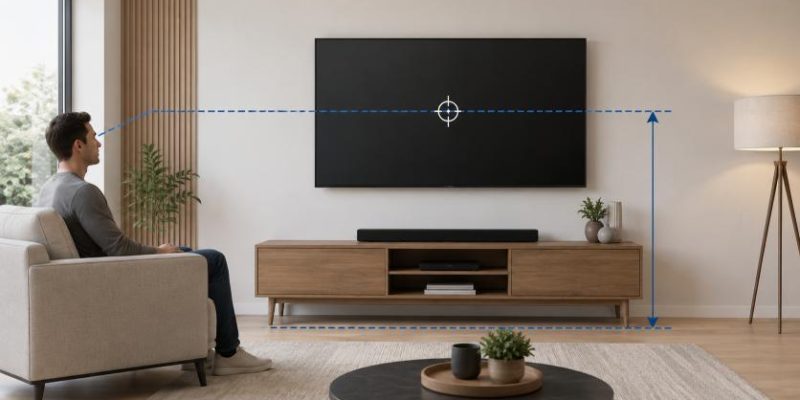
Getting TV placement right requires working backward from your seating rather than measuring from the ceiling or centering the screen on an empty wall. The goal is simple: the vertical center of the screen should align closely with your eye level when seated in your normal viewing position.
Step-by-Step Eye-Level Measurement
You can find your ideal mounting height in under five minutes with a tape measure and a piece of painter’s tape:
-
Sit on your primary sofa or recliner in the posture you actually use when watching television, whether upright or casually slumped into the cushions.
-
Have a second person measure the distance from the floor straight up to your eyes. For most adults on standard sofas, this falls between 40 and 42 inches.
-
Divide the vertical height of your television (not the diagonal screen measurement) in half. For example, a 65-inch TV is roughly 32 inches tall, so half its height is 16 inches.
-
Subtract that half-height from your seated eye level to find where the bottom edge of the TV should sit. Using the 42-inch eye level example, the bottom of a 65-inch screen lands around 26 inches off the floor, putting the center right at 42 inches.
If your living room has deep, low-slung lounge seating or bar-height stools behind a kitchen island, average the eye levels of the spots used most often. Even when accommodating multiple seating zones, keeping the center of the screen between 40 and 48 inches from the floor preserves comfortable neck alignment for almost everyone in the room.
Additional Risks of Mounting a TV Above a Fireplace
Neck discomfort is the primary complaint with over-the-mantel screens, but heat and viewing distance compound the problem in ways buyers often overlook during installation.
Heat and Soot Exposure
Wood-burning and gas fireplaces generate substantial radiant and convective heat, especially when a blower fan pushes warm air out from beneath the mantel. Modern OLED and QLED panels contain delicate organic compounds, adhesives, and power supply capacitors that degrade faster when exposed to sustained ambient temperatures above 95 degrees Fahrenheit. Even if a mantel shelf deflects some rising heat, wall surfaces directly above an active firebox regularly run hotter than manufacturers recommend, which can shorten panel lifespan or void warranty coverage.
Viewing Distance and Eye Fatigue
When a screen sits high on the wall, sitting close to it makes the upward viewing angle steeper. A 65-inch TV viewed from eight feet away at a 42-inch center height requires virtually zero upward neck tilt. Raise that same screen to 75 inches off the floor at the same eight-foot distance, and your upward gaze angle jumps past 20 degrees. Wider rooms with 12 to 15 feet of seating distance soften the angle slightly, yet they still fall short of the relaxed neutrality of an eye-level mount.
Practical Alternatives When the Fireplace Dominates the Room
In many American homes—especially open-concept floor plans built around a central hearth—the fireplace wall feels like the only logical place for a television. You do not have to choose between rearranging your entire house and living with a stiff neck; several layout and hardware solutions solve the problem cleanly.
Shift the TV to an Adjacent Wall
Look at the walls perpendicular to the fireplace. Placing the television on a low media console along an adjacent solid wall lets you mount or stand the screen at true eye level while creating an L-shaped or conversational seating arrangement. A sofa facing the TV paired with two accent chairs angled toward the hearth lets both features shine without competing vertically on the same wall.
Use a Pull-Down Fireplace TV Mount
If the fireplace wall truly is the only viable location because of windows, doorways, or traffic flow, a articulating pull-down mantel mount offers a mechanical workaround. These heavy-duty counterbalanced arms attach above the mantel and allow you to pull the television outward and down by 20 to 30 inches whenever you watch, bringing the center of the screen much closer to seated eye level. When the fire is lit or the TV is off, the arm tucks the screen back up above the mantel safely out of the heat zone.
Lower the Mantel or Choose a Linear Fireplace
If you are planning a custom build or full fireplace remodel, rethink the vertical stack before drywall goes up. Modern linear gas or electric fireplaces have low, wide profiles that sit just 12 to 18 inches off the floor without requiring a thick masonry surround. Pairing a low-profile firebox with a minimalist non-combustible mantel—or skipping the mantel shelf altogether—lets you mount a television at 45 to 50 inches to center, bridging the gap between architectural symmetry and everyday physical comfort.
Designing a living room around how people actually sit pays off every single evening. Before drilling lag bolts into studs above a mantel, measure your seated eye height, test the viewing angle with painter’s tape on the wall, and give your neck the neutral posture it needs to relax.
What is your reaction?
Excited
0
Happy
0
In Love
0
Not Sure
0
Silly
0